Aeria WeatherStudio
A real-time climate dashboard powered by Rust. Fast, resilient, and beautifully designed.
Real-Time Climate Intelligence
Rust-powered weather dashboard with live data, air quality monitoring, and a native desktop app
Live Weather Data
Any city worldwide via Open-Meteo
Dynamic Scenes
UI adapts to weather conditions
Rust Backend
Axum + Tokio async performance
Desktop App
Native Windows installer via Tauri
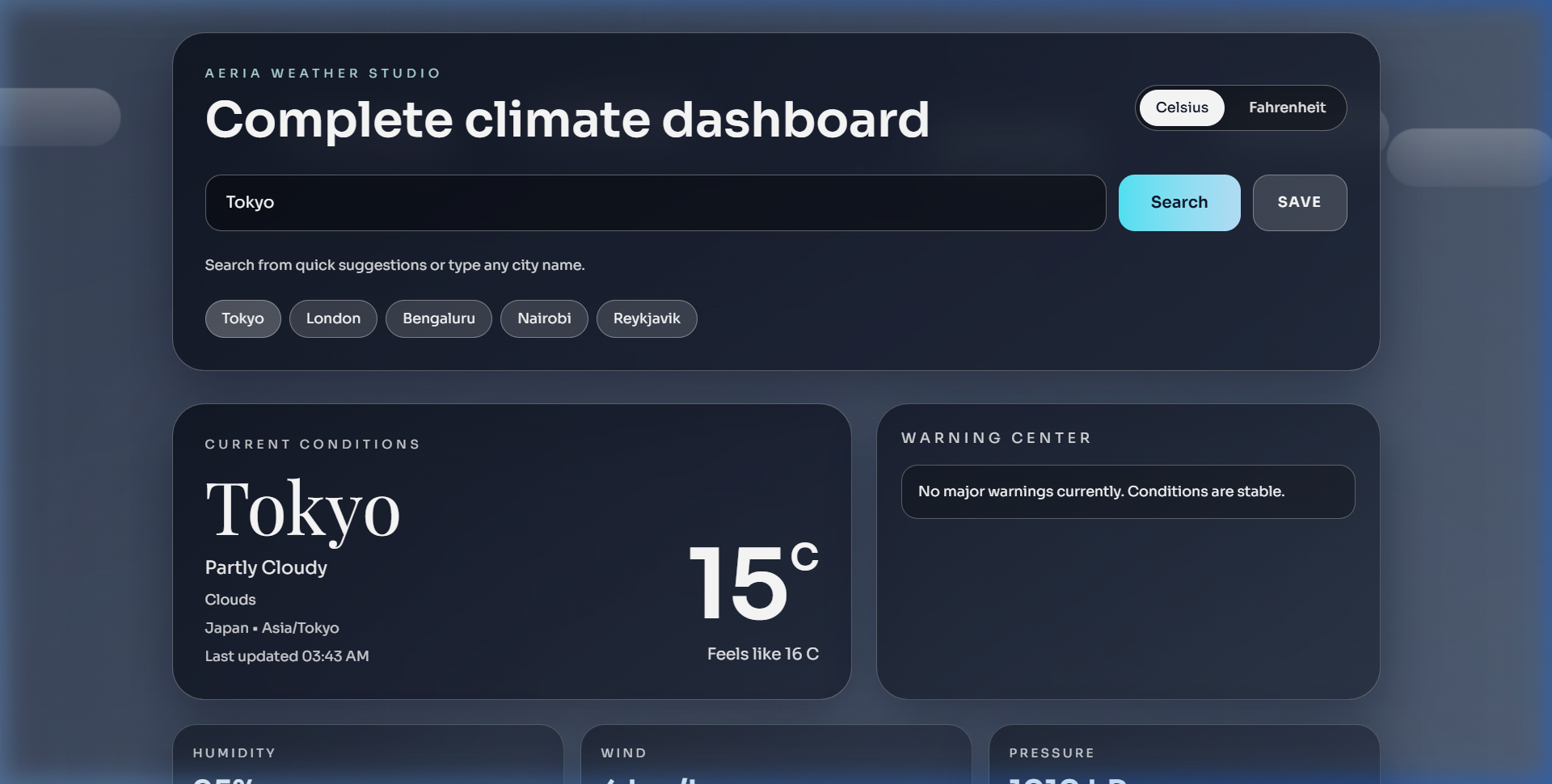
Complete Climate Dashboard
Everything you need to stay ahead of the weather, packaged in a sleek interface.
Live Weather
Real-time conditions for any city worldwide via Open-Meteo API with millisecond latency.
Air Quality
Comprehensive US AQI, PM2.5, PM10 readings with actionable health guidance alerts.
Dynamic Scenes
UI gradients and animations that adapt dynamically to sunny, rainy, stormy, or snowy conditions.
JavaScript vs Rust
See why Rust is the ideal choice for high-performance weather backends and desktop applications.
How It Works
Request Flow
Deep Dive
Aeria Weather Studio is a real-time climate dashboard that combines the raw performance of Rust with a beautiful Next.js frontend, all packaged as a native Windows desktop application via Tauri.
�Problem Statement
Existing weather applications suffer from:
- Bloated interfaces cluttered with ads and unnecessary features
- Slow performance caused by JavaScript-heavy server-side processing
- No desktop option — most weather apps are web-only with no native experience
- Limited data — basic temperature without air quality, UV, or detailed forecasts
- No offline data persistence — can't save favorite cities or recent searches
�Solution
Aeria Weather Studio reimagines the weather app as a developer-grade climate dashboard:
Rust-Powered Backend
The backend is an Axum HTTP server running on Tokio's async runtime. It geocodes city names, then fetches current conditions, hourly forecasts, daily outlooks, and air quality data from Open-Meteo — all in parallel using Tokio tasks for maximum throughput.
Dynamic Weather Scenes
Background gradients and CSS animations change dynamically based on current conditions — sunny golden gradients, rainy blue tones with animated droplets, stormy dark atmospheres with lightning flashes, snowy white landscapes, and foggy desaturated scenes.
Native Desktop Experience
Via Tauri 2, the entire web application is packaged into a lightweight native Windows installer (.exe). The desktop build automatically connects to the deployed Render backend, giving users a native app experience with zero setup.
�System Architecture
Rust Workspace
The project is organized as a Rust workspace with three crates:
- backend — Axum HTTP server with routes for health check and weather data. Uses Reqwest for parallel API calls and Serde for JSON serialization.
- shared — Common data types (WeatherReport, CurrentWeather, HourlyForecast, DailyForecast, AirQuality) shared between crates for type safety across the entire backend.
- frontend/src-tauri — Tauri desktop shell that wraps the Next.js frontend into a native window with full OS integration.
Frontend (Next.js 16 + React 19)
- Framework: Next.js 16 with App Router
- Styling: Tailwind CSS 4 with custom weather-themed design system
- Dynamic Scenes: CSS gradient transitions and keyframe animations tied to weather conditions
- Responsive: Fully mobile-optimized with touch-friendly interactions
- State: City favorites and recent searches persisted in localStorage
Deployment Pipeline
- Frontend — deployed on Vercel (Next.js)
- Backend — deployed on Render (compiled Rust binary)
- Desktop — Tauri NSIS installer via GitHub Releases
�Key Features
| Feature | Description |
|---|---|
| **Live Weather** | Real-time temperature, feels-like, humidity, wind, pressure, visibility |
| **Hourly Forecast** | 12-hour temperature trend with rain probability |
| **7-Day Outlook** | Daily highs/lows, sunrise/sunset, precipitation chance |
| **Air Quality** | US AQI, PM2.5, PM10 readings with health guidance |
| **Warning Center** | High UV, heavy precipitation, strong wind, extreme temperature alerts |
| **Dynamic Scenes** | Background changes for sunny, rainy, stormy, snowy, foggy, cloudy |
| **Unit Toggle** | Switch between Celsius and Fahrenheit |
| **Favorites** | Save cities and quickly revisit recent searches |
| **Desktop App** | Native Windows installer via Tauri (NSIS) |
�Technical Implementation
Request Flow
City Search → Geocoding API → Parallel Fetch (Current + Hourly + Daily + AQI) → WeatherReport JSON → Dynamic UI Rendering
Parallel Data Fetching (Rust)
The backend uses Tokio's join! macro to fetch all weather data streams simultaneously, reducing total response time from ~2s (sequential) to ~500ms (parallel).
Shared Type System
The shared crate defines strongly-typed Rust structs (WeatherReport, CurrentWeather, etc.) that are used by both the backend and the Tauri shell, ensuring type safety across the entire Rust workspace.
Desktop Build Pipeline
The Tauri build uses a custom script that injects the production API URL at build time via environment variables, ensuring the desktop app connects to the deployed Render backend rather than localhost.
�Performance Highlights
- ~500ms average API response time (parallel fetching)
- ~8MB desktop installer size (Tauri NSIS)
- Zero runtime dependencies — compiled Rust binary
- Global coverage — any city worldwide via Open-Meteo
�Tech Stack
Backend: Rust, Axum, Tokio, Reqwest, Serde, Open-Meteo API
Frontend: Next.js 16, React 19, TypeScript, Tailwind CSS 4
Desktop: Tauri 2, NSIS Installer
Infrastructure: Vercel (Frontend), Render (Backend), GitHub Releases (Desktop)